A friendlier Loom alternative for teams that need the next step
Record.
Then move the work forward.
RecordThen helps anyone explain work on screen, then turn that recording into documentation, tickets, team plans, public shares, one-shot prompts, or AI-ready build context.
One recording, many outcomes
Docs, shares, tickets, plans, prompts, or AI-ready context.
Developer-ready
Repos, tickets, plans, and agentic workflow context when you need them.
Built for the whole team
Product, support, QA, and leadership can create context developers trust.
What happens after the recording
Every recording becomes useful team context.
Capture the screen and voiceover, then keep the transcript, key moments, screenshots, decisions, and next-step options attached to one source of truth.
Documentation
Transcript, screenshots, and steps from one walkthrough.
Team share
Private context for teammates, stakeholders, support, and QA.
Ticket or plan
Turn the recording into tracked work your team can review.
Developer handoff
Repos, tickets, one-shot prompts, and AI-ready build context.
Record, then choose the outcome
The recording is where the work gets organized.
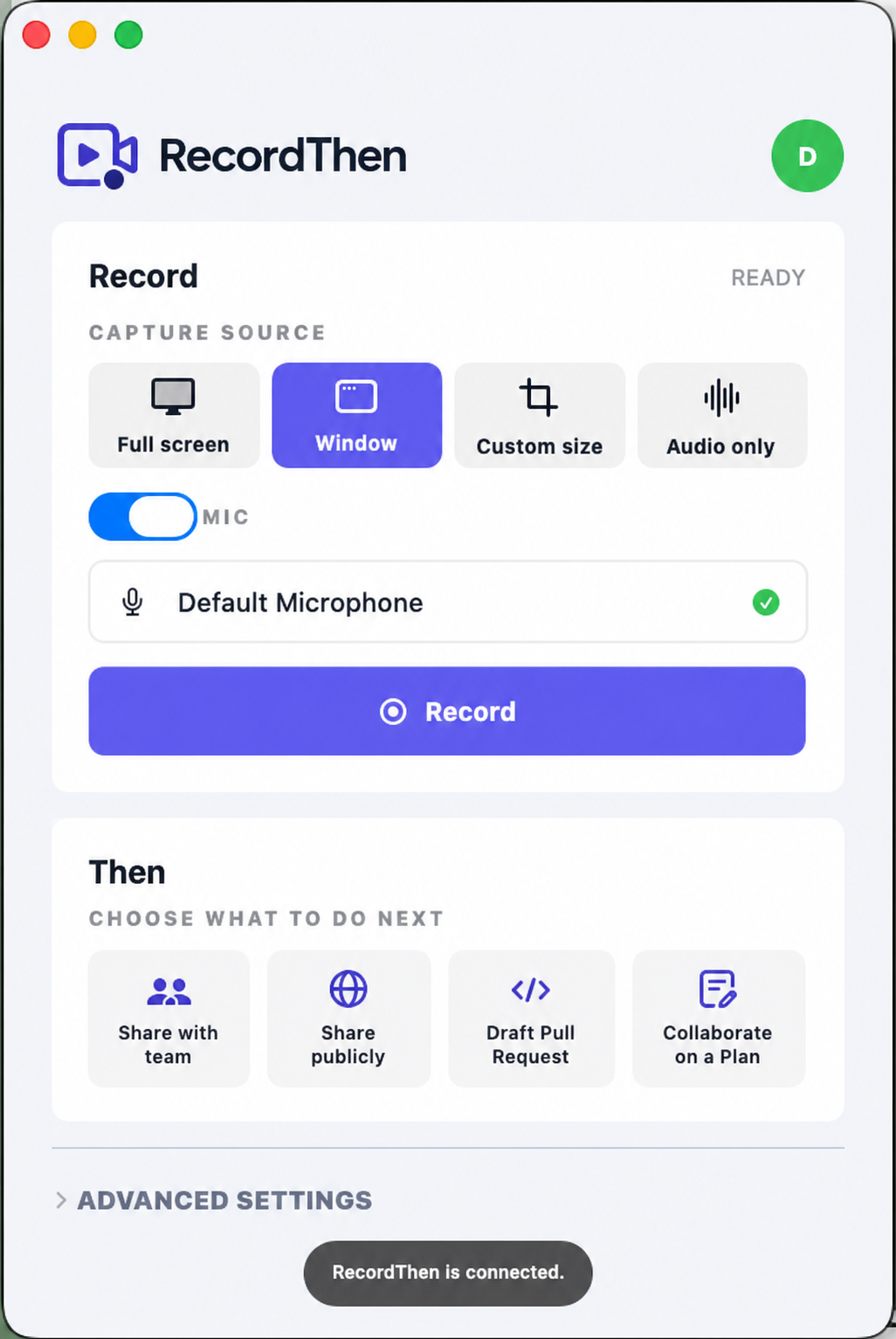
The screen recording is the raw material. RecordThen turns it into the transcript, summary, stakeholder plan, and handoff your team needs before AI or developers start building.
Record
Capture a screen, window, browser tab, or audio-only note while you talk through the context.
Then document
RecordThen creates the transcript, key moments, screenshots, and summary your team can reuse.
Then collaborate
Invite stakeholders to review the source material, shape the plan, and agree on what should happen.
Then delegate
Hand clean context to tickets, one-shot prompts, implementation plans, or your AI workflow of choice.
For more than engineering
Approachable for anyone who needs to explain work.
You do not have to be a developer to advocate for RecordThen. If you can talk through a product workflow, bug, customer question, design review, or operating process, you can create the context that helps developers, AI tools, and the rest of the company move faster.
Product managers
Turn customer context, product ideas, and decision notes into plans engineers can act on.
Team leaders
Give stakeholders a place to align without buying every reviewer another video seat.
Support and QA
Record bugs, workflows, and customer reports with the details teams need next.
Documentation builders
Start with a narrated walkthrough while RecordThen pulls out the steps and source material.
Developers
Attach repositories, tickets, transcripts, prompts, and AI-ready implementation context.
Anyone explaining work
Record the thing that is hard to write down, then choose what should happen next.
Plenty for developers too
When the work becomes technical, the context is already there.
RecordThen can stay simple for non-technical users and still carry the repository, ticket, transcript, and plan context developers need to act quickly.

GitHub
Attach repositories and prepare implementation context for code review or agentic workflows.

Jira
Move reviewed recordings into tracked delivery work without losing the original explanation.

Linear
Turn lightweight product context into focused engineering issues and team follow-through.
One-shot prompt
Turn a recording into a context-aware prompt for a focused fix in your AI tool of choice.
Repo-aware handoff
Connect the repositories that matter so AI and human reviewers start with concrete context.
Collaborate on a Plan
Open the conversation to product, support, QA, leadership, and engineering before implementation starts.
Observability-aware capture
The Chrome extension understands common observability pages so tickets include screenshots, markdown, stack traces, and useful page context.
Project-based pricing
A much better value than per-user screen recording seats.
Loom-style pricing gets expensive as soon as product, engineering, support, QA, leadership, and customers need to review the same context. RecordThen gives each project defined contributors and unlimited viewers, so collaboration stays affordable.
Solopreneur
Free 10-day trialBest when one person owns the build plan.
- Unlimited plan viewers
- AI technical plans
- Desktop apps
- GitHub repo awareness
Startup
Free 10-day trialDefault choice for teams shipping together.
- 2 to 10 contributors
- Jira and Linear connectors
- Shared plan board
- Ticketed changelog handoff
FAQ
Questions before you record?
No. RecordThen is for anyone who can explain something on screen. Product managers, support teams, QA, team leads, and documentation builders can all create useful context without touching developer tools.
RecordThen keeps the fast screen-recording experience, then adds the structured next steps Loom leaves behind: documentation, tickets, collaborative plans, developer handoff, and project-based pricing that is much cheaper for teams with many viewers.
Loom-style per-user pricing gets expensive when product, engineering, support, QA, leadership, and customers all need to review context. RecordThen prices around project workspaces with contributor limits and unlimited viewers, so collaboration does not become a seat-tax problem.
RecordThen was built with developers in mind: repository context, Jira and Linear handoff, implementation plans, one-shot prompts, and source material for agentic workflows. The product stays approachable so other stakeholders can contribute the context developers need.
Yes. A narrated walkthrough gives RecordThen the raw material for transcripts, key moments, screenshots, summaries, and reusable source context that can become internal docs, support notes, or implementation plans.
Record the context. Then make it useful.
Create documentation, tickets, shared plans, public links, and developer-ready handoffs from the same recording.